


Introduction: Why Learning the Aarogyaa Bharat Process
Matters
Home healthcare in India is growing rapidly as more families prefer recovery and elderly care in the comfort of their homes. Platforms like Aarogyaa Bharat simplify access to essential medical equipment by offering both rental and purchase options in one place. However, many first-time users hesitate because they are unsure about login steps, checkout flow, or payment methods. Understanding the complete journey from entering the website to placing an order helps users save time, avoid confusion, and ensure they receive the right equipment quickly. This guide explains every step clearly so anyone can confidently use the platform without technical knowledge.
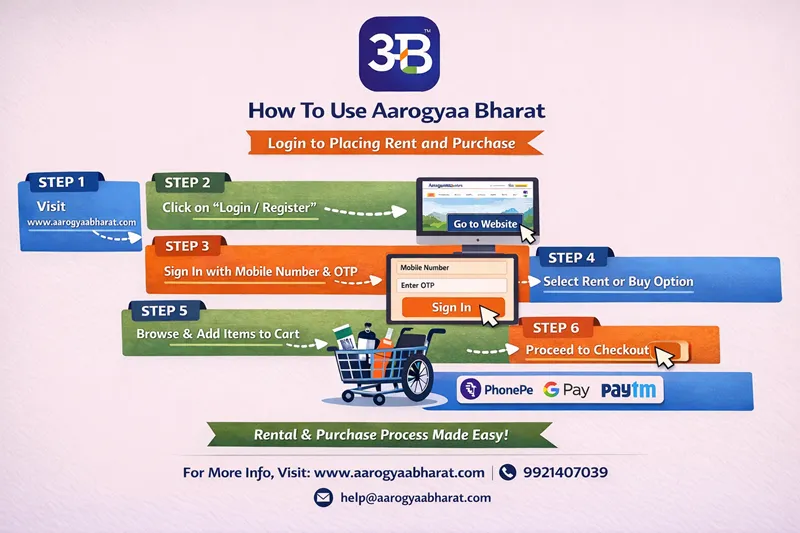
Step 1: Visit the Official Aarogyaa Bharat Website
The first step is opening the official Aarogyaa Bharat website in your browser. Always ensure you are visiting the correct domain to maintain safety and avoid fake pages. Once the homepage loads, you will see categories like hospital beds, wheelchairs, oxygen equipment, commode chairs, and rehabilitation products. The homepage is designed for easy navigation so even senior citizens or caregivers can explore products smoothly.
Step 2: Click on Login or Register
After reaching the homepage, locate the Login / Register option. This section allows both new users and existing customers to access their accounts. If you are visiting for the first time, you will create a new profile using your mobile number. Returning users can simply log in to view saved addresses, previous orders, and faster checkout options.
Step 3: Sign In Using Mobile Number and OTP
Aarogyaa Bharat uses OTP-based authentication for security and simplicity. Enter your mobile number, receive a one-time password, and verify it to access your account instantly. This method removes the need for complex passwords and ensures safe login for elderly users and caregivers who may not be comfortable remembering login credentials.
Step 4: Choose Rent or Buy Option
One of the biggest advantages of Aarogyaa Bharat is the flexibility to either rent or purchase medical equipment. Users recovering from surgery or short-term conditions often prefer rental options, while long-term patients may choose to buy products. Selecting the right option helps you control costs while ensuring comfort and safety during recovery.
Table: Rent vs Purchase - Quick Comparison
| Feature | Rent Option | Buy Option |
|---|---|---|
| Best For | Short-term recovery | Long-term usage |
| Cost | Lower upfront cost | One-time investment |
| Maintenance | Often included | Self-managed |
| Flexibility | Easy return or upgrade | Permanent ownership |
Step 5: Browse Products and Add to Cart
Once logged in, you can explore categories or search for specific products such as wheelchairs, walkers, oxygen concentrators, hospital beds, or physiotherapy equipment. Each product page provides clear specifications, images, pricing, and availability. When you find the right item, simply click Add to Cart to move forward with the order.
Step 6: Proceed to Checkout
After adding products, go to the checkout page to confirm your order. Here you will review product details, rental duration if applicable, delivery address, and installation requirements. Aarogyaa Bharat focuses on transparent pricing so customers clearly understand rental charges, deposits, or purchase costs before completing payment.
Table: Checkout Information Checklist
| Detail to Verify | Why It Matters |
|---|---|
| Delivery Address | Ensures correct installation location |
| Rental Duration | Avoids billing confusion |
| Product Variant | Confirms correct equipment type |
| Contact Number | Needed for delivery coordination |
Step 7: Make Payment and Place Order
The final step is payment. Aarogyaa Bharat supports secure digital payment methods including UPI apps like PhonePe, Google Pay, Paytm, and other options. Once payment is completed, your order is confirmed and the team begins processing delivery and installation based on your selected city and product.
Benefits of Using Aarogyaa Bharat for Medical Equipment
Aarogyaa Bharat is not just an online store; it is a complete home healthcare ecosystem. The platform focuses on quality, safety, and user convenience. Customers benefit from professional guidance, transparent pricing, and doorstep delivery. For families managing elderly care or post-surgery recovery, the ability to rent or buy equipment quickly reduces stress and improves patient comfort.
Tips for First-Time Users
If you are new to Aarogyaa Bharat, always check product descriptions carefully and choose rental duration based on medical advice. Keep your mobile phone ready for OTP login, and double-check delivery details during checkout. If unsure, you can contact customer support before placing the order to ensure you select the right equipment.
Conclusion: A Simple and Reliable Ordering Experience
Using Aarogyaa Bharat is designed to be straightforward even for users who are not tech-savvy. From OTP login to flexible rent or buy options and secure UPI payments, the platform ensures a smooth experience from start to finish. By following the steps explained in this guide, families can quickly arrange essential medical equipment at home and focus on recovery, comfort, and peace of mind.